Summary
How to Import Accounts and Contacts via the Data Import Wizard.
How-To
Task: Load Contacts and Accounts into Salesforce
Instructions
Step 1 - Prepare your data for import in CSV format Note: make sure you have data in all the required fields.
- Required Contact Fields: Last Name, Email, and Account ID (Individual account as a default)
- Required Account Fields: Name
Step 2 - Click the gear icon in the top right of your home screen
 Click for full-size image
Step 3 - from Setup, enter Data Import Wizard in the Quick Find box
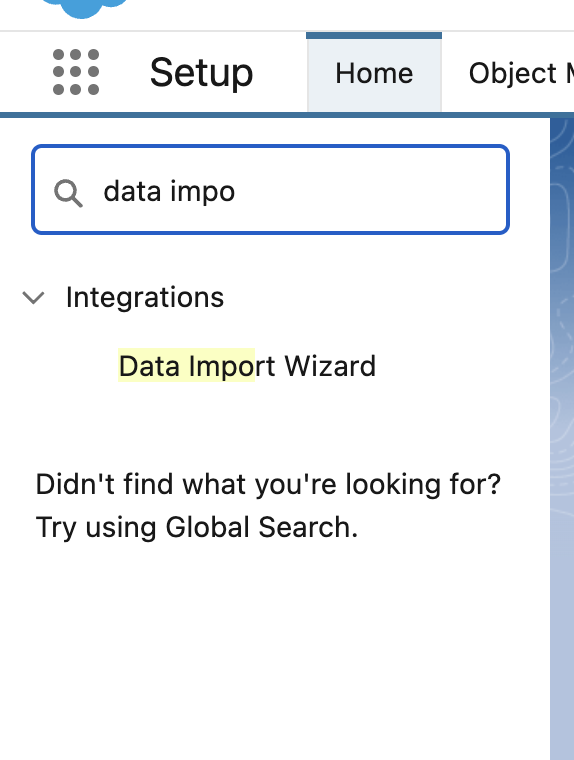
Step 4 - Open Data Import Wizard
Step 5 - Select Accounts and Contacts
Step 6 - Select Add new records, Update existing records, or Add new and update existing records
Step 7 -
A - Match Contacts by Email or Name
B - Match Accounts by Original Salesforce ID
C - Match "Connected By" look up field by Salesforce.com ID
D - Select - "Trigger Workflows and processes?"
E - Record type:
1. Your assigned department if contacts should be private
2. Shared if it should be open to anyone
Step 8 - Add your CSV file
 Click for full-size image
Step 9 - Map CSV fields to Salesforce Fields
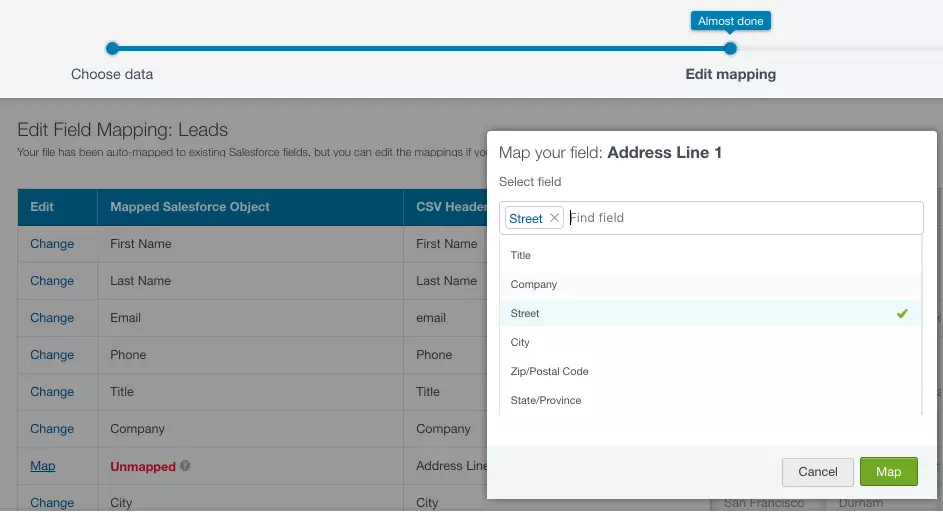
Step 10 - Start Import
Outcome
Your records should import into Salesforce
Further Readings
Help Articles:
https://www.saasguru.co/data-import-wizard-salesforce/?srsltid=AfmBOorZ8AO7t_WEe1N-A5IkAwlzynbnnIZzj2kei5So_dZobcNIlwW1
https://www.salesforceben.com/introduction-to-the-data-import-wizard-for-salesforce/
https://help.salesforce.com/s/articleView?id=xcloud.notes_on_importing_data.htm&type=5
https://help.salesforce.com/s/articleView?id=xcloud.import_with_data_import_wizard.htm&type=5
Videos:
https://www.youtube.com/watch?v=1rsAPfTxNRw
Trailhead:
https://trailhead.salesforce.com/content/learn/modules/lex_implementation_data_management
https://trailhead.salesforce.com/content/learn/projects/import-and-export-with-data-management-tools
Need additional help?
If you have any additional questions, please submit a ticket by using the ECRM Services Support Form.